How to Fix the macOS Security Warning for Find my Font
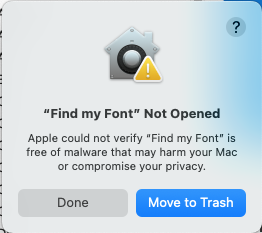
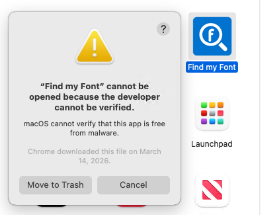
The message 'Apple could not verify "Find my Font" is free of malware' is a standard alert from macOS Gatekeeper. It typically appears for apps downloaded outside the official Mac App Store that haven't been "notarized" or registered with Apple.
This warning does not mean the app is harmful; it simply means Apple has not scanned this specific version of the software for malicious content. Find my Font is safe to use — follow the steps below to allow it.
How to Open the App
First, click Done or Cancel to dismiss the warning. Then follow these steps:
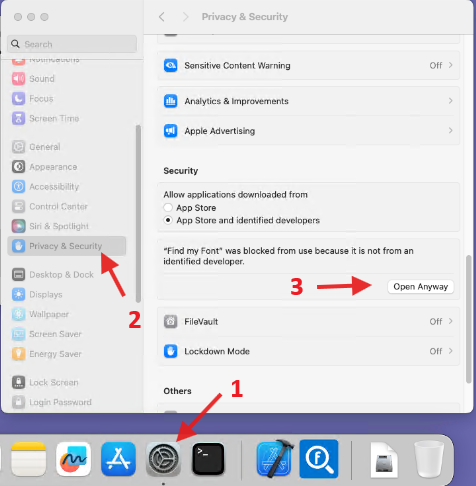
- Open System Settings and
- Navigate to Privacy & Security
- Scroll down to the Security section. You should see a note about "Find my Font" being blocked.
Click Open Anyway.
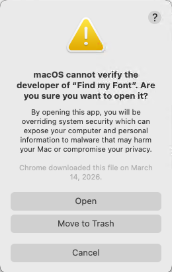
- Enter your administrator password if prompted, then click Open again to confirm.

That's all there is to it. Find my Font will now open normally, and macOS won't ask for confirmation again.
If you follow the above instructions and you still cannot run Find my Font it means that macOS is still blocking the application due to Gatekeeper security restrictions. On newer macOS versions, clicking Open Anyway sometimes doesn't fully remove the quarantine flag.
Please try the following steps:
- Open Terminal (Applications → Utilities → Terminal)
- Type the following command and press Enter:
xattr -dr com.apple.quarantine /Applications/Find\ my\ Font.app - After running the command, try launching Find my Font again.
If your app is located somewhere other than the Applications folder, please adjust the path accordingly, or you can drag the app into the Terminal window after typing:xattr -dr com.apple.quarantine
This should remove the macOS quarantine restriction and allow the application to run normally.